
Activity Stats gives you a detailed overview of your tennis and pickleball match activity, helping you understand how much you've played and how your activity compares to other players.
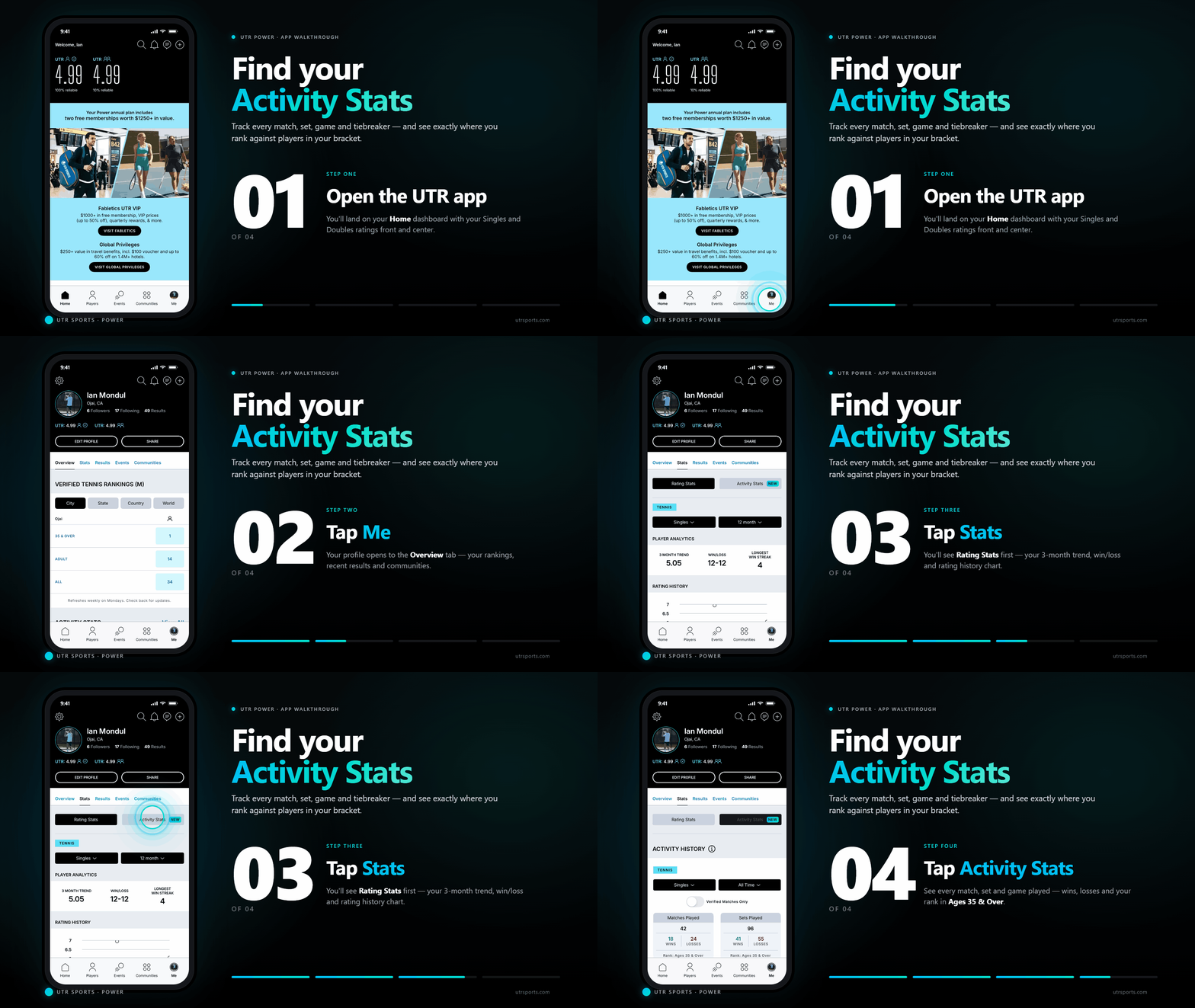
You can find Activity Stats by navigating to Player Profile > Stats > Activity Stats on the web or in the UTR Sports app.
What data is included?
Activity Stats provides breakdowns across
- Metrics displayed:
- Matches (played, won, lost)
- Sets (played, won, lost)
- Games (played, won, lost)
- Deciding sets
- Straight sets
- Tiebreak sets
- Pickleball formats (one-game / multi-game matches)
- Age-group rank for each metric
- Filters:
- Sport: Tennis / Pickleball
- Format: Singles / Doubles
- Verification: Verified vs All
- Time range:
- All-time
- 12 months
- Year-to-date
- 6 months
- 3 months
- 1 month
Free vs. Power: What's the difference?
Feature | Power | Free |
| Matches Played | ✔️ | ✔️ |
| Sets Played | ✔️ | ✔️ |
| Games Played | ✔️ | ✔️ |
| World Activity Rank | ✔️ | ✔️ |
| Decisive Set Matches | ✔️ | ❌ |
| Straight Set Matches | ✔️ | ❌ |
| Tiebreaker Sets | ✔️ | ❌ |
| All Time filter | ✔️ | ✔️ |
| 12 Months | ✔️ | ❌ |
| Year to Date (YTD) | ✔️ | ❌ |
| Last 6 Months | ✔️ | ❌ |
| Last 3 Months | ✔️ | ❌ |
| Last 1 Month | ✔️ | ❌ |
Why are some stats or filters locked?
Some Activity Stats features are exclusive to Power subscribers.
If you're using a Free account, you'll be able to see your lifetime totals for Matches Played, Sets Played, and Games Played. Advanced metrics and additional time filters will appear locked and can be unlocked by upgrading to Power.